

This guide explains how to manage synchronized WooCommerce course products created by CourseTransit.
After Moodle courses are synchronized, administrators can open the full WooCommerce product editor to customize course information, pricing, product settings, categories, media, and additional WooCommerce configurations.
Open the Full Product Edit Page
Each synchronized Moodle course is connected to a WooCommerce product inside WordPress.
CourseTransit provides direct access to the complete WooCommerce product editor from the Courses page.
Steps
- Navigate to CourseTransit → Courses
- Locate the synchronized course
- Click the Quick Edit button
- Select Open full edit page
CourseTransit redirects you to the WooCommerce product editor for the selected course product.
Administrators can then fully customize the synchronized course product using standard WooCommerce functionality.
WooCommerce Product Editor Overview #
The WooCommerce product editor allows administrators to manage all product-related settings for synchronized Moodle courses.
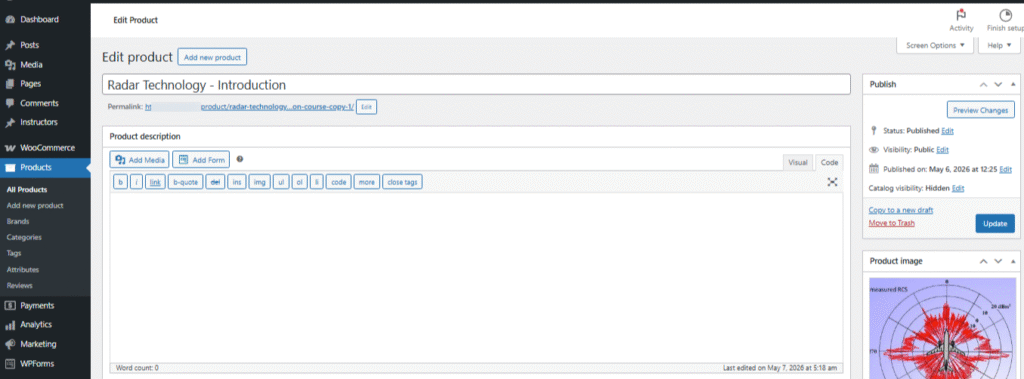
Inside the editor, administrators can access:
- Product title and permalink
- Product descriptions
- Product data settings
- Course content sections
- Product images and galleries
- Categories and tags
- Product publishing controls
This provides complete flexibility for customizing synchronized course products inside WooCommerce.
Manage Product Information #
Administrators can update general product information directly from the WooCommerce editor.
This includes:
- Product title
- Product slug
- Product description
- Product short description
- Product image
- Product gallery
- Product categories
- Product tags
Changes made inside the WooCommerce editor are reflected on the frontend course product page displayed to students.
Configure Product Data #
ℹ️ ImportantChanges made inside WooCommerce product settings may affect frontend course visibility, pricing, and purchase behavior.
The Product Data section allows administrators to configure WooCommerce pricing and product behavior.
Available options may include:
- Product type
- Virtual product settings
- Downloadable product settings
- Regular pricing
- Sale pricing
- Inventory management
- Linked products
- Product attributes
- Advanced WooCommerce settings
These settings control how synchronized Moodle courses behave inside the WooCommerce store.
Manage Course Content Sections #
CourseTransit adds dedicated course content fields inside the WooCommerce product editor for managing learning-related information.
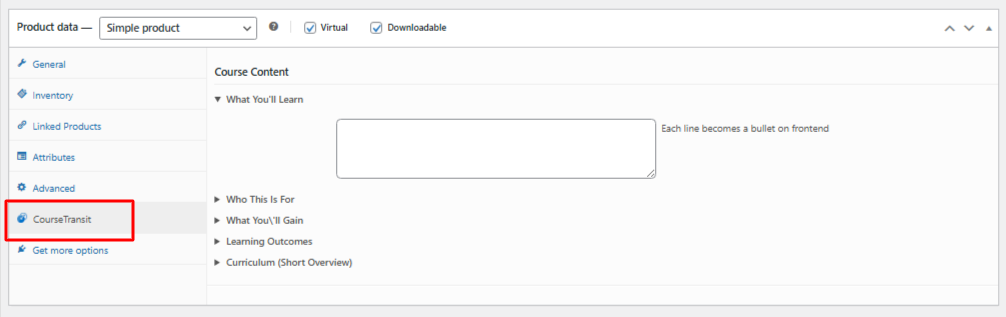
Administrators can update:
- What You’ll Learn
- Who This Is For
- What You’ll Gain
- Learning Outcomes
- Curriculum Overview
These sections help create a more informative and engaging course product page for students.
Updating structured course information can improve:
- Course presentation
- Student understanding
- Product conversions
- Learning expectations
Manage Product Media #
Administrators can customize synchronized course media directly inside WooCommerce.
This includes:
- Featured product image
- Product gallery images
- Course thumbnails
Well-designed course media helps improve visibility and creates a more professional learning experience.
Organize Course Products #
WooCommerce organization features can also be used with synchronized CourseTransit products.
Administrators can assign:
- Product categories
- Product tags
- Brands
- Product attributes
This helps organize large course catalogs more effectively inside WooCommerce stores.
Publish Product Changes #
After making product or course modifications:
- Review all changes carefully
- Click the Update button
- Verify the product page on the frontend
Updated product information becomes immediately available to students and customers after publishing.
Important Notes #
- CourseTransit automatically synchronizes Moodle-related course data
- WooCommerce product settings can still be customized manually
- Avoid removing required CourseTransit metadata from synchronized products
- Review pricing and visibility settings after synchronization updates
- Use categories and tags to organize large course libraries
Proper WooCommerce product management ensures synchronized Moodle courses remain organized, informative, and optimized for student enrollment.